
No products in the cart.
LG Air Purifiers
Showing the single result
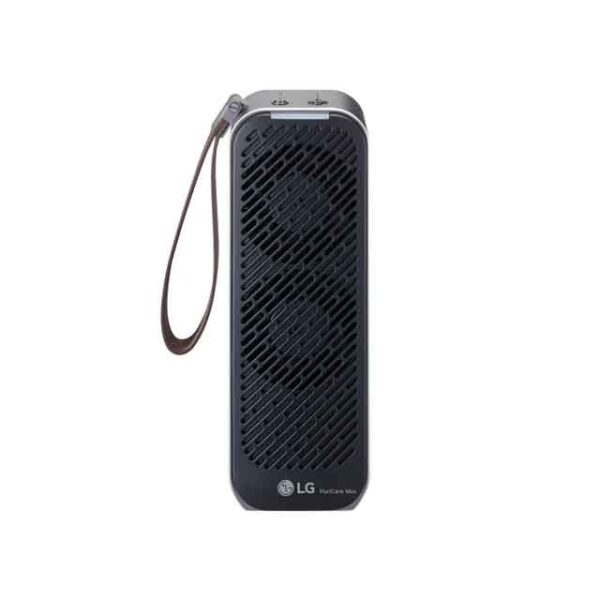
Showing the single result
Shop LG Air Purifiers in Pakistan
Why air purification matters at home
Pakistan’s urban air can carry dust, smog and allergens that make rooms feel heavy and stuffy—especially during winter smog and summer sandstorms. An LG air purifier helps reduce airborne particles so bedrooms, lounges and study rooms feel fresher. Results vary by home layout and habits, but consistent use plus simple placement tweaks can make a noticeable difference.
What you’ll find on this page
Below you’ll get a plain-English guide to choosing the right LG air purifier by room size, understanding filters and upkeep, electricity use, and how LG compares with other brands we stock. You can browse current options on our category page: LG Air Purifiers.
Quick actions
Need a quick recommendation? Call 0321 2222391 or visit Yasir Electronics, Hashoo Centre, Shop 61, Abdullah Haroon Road, Saddar, Karachi. Prefer online? Start at our LG shop page linked above.
Choose by Room Size (Get the Right CADR)
CADR & coverage explained
Clean Air Delivery Rate (CADR) is a simple indicator of how quickly a purifier can reduce particles in a space. As a rule of thumb, match the CADR to your room’s square footage: larger rooms need higher CADR. If you keep doors/windows open often, size up for better results.
Match your room to the right class
Small rooms/bedrooms: Pick compact models designed for single beds or home offices. Master beds & lounges: Choose higher-airflow units that can circulate air across corners and seating areas. If you’re comparing multiple brands together, see our brand-agnostic Air Purifiers category.
Placement tips for Pakistani homes
Place the unit where air can move freely—roughly a foot from walls, away from curtains. In Karachi and Lahore, seal obvious door/window gaps and avoid placing the purifier behind sofas. For bedrooms, start 30–60 minutes before sleep or use auto/sleep modes if available.
LG PuriCare™ Highlights (What Sets Them Apart)
360° intake & room-wide circulation
Many LG PuriCare™ models draw air from all sides, which helps them pull polluted air from corners and push cleaner air across the room. In real homes—especially Karachi apartments with mixed furniture—this 360° approach can feel more consistent than front-only designs. You still get the best results by giving the unit breathing space (about a foot from walls) and avoiding tight alcoves that block airflow.
Multi-stage filtration with particle sensing
LG units typically combine a washable pre-filter for large dust, a high-efficiency HEPA stage for fine particles, and an activated carbon layer for odours and smoke. A built-in particle sensor (often down to PM1.0 on supported models) helps the purifier react to changing air quality, and many models display an easy colour indicator so you can see improvements at a glance. Exact filter type and code vary by model—always confirm the filter code on your product label or manual before ordering replacements.
Smart control and quiet modes
With LG ThinQ™ support on compatible models, you can check air status, power the unit on/off, and adjust fan speed or schedules from your phone. Auto mode can ramp up when pollution spikes and settle down when the room is clean, which is handy for bedtime. Sleep/Whisper modes aim for low sound levels suited to bedrooms, and features like child lock and filter alerts make day-to-day use simpler.
Use-Case Picks (What to Buy For…)
Dust & allergies
Look for models highlighting HEPA filtration and a decent CADR for your room size. Keep the washable pre-filter clean—Pakistan’s dust can load it quickly and reduce airflow. For night comfort, run the purifier 30–60 minutes before sleep, then use Auto or Sleep mode to maintain clean air while keeping noise down.
Remember, symptom relief varies by person and environment. For seasonal flare-ups, combine purification with basic housekeeping: damp-dusting, shoe-off zones, and closing windows during high-dust hours.
Smoke & urban pollution
If you live near busy roads or face winter smog, prioritise units with strong particulate performance and a meaningful carbon layer for gases/odours. Seal common leak points (door bottoms, window gaps) so the purifier isn’t fighting a constant inflow of outdoor air.
During cooking or incense use, keep the purifier running in Auto or a higher fan setting to clear particles faster, then step down once the indicator shows improvement.
Pets & odours
Choose models with an effective carbon stage and easy pre-filter access—pet hair and dander build up quickly. Place the unit in the living area where pets spend time, not tucked away; airflow across the room is key. Regular vacuuming and litter-area hygiene will amplify the purifier’s results.
Asthma & sensitivities
For sensitive users, aim for the right CADR for your room and keep doors closed to maintain air changes. Avoid strong fragrances and aerosol cleaners that can trigger reactions. A purifier is a supportive tool—not a medical device—so always follow your doctor’s advice.
Filters & Maintenance (Costs, Lifespan, Replacements)
Filter stages and what H13 HEPA means
Most LG PuriCare™ units use a multi-layer setup: a washable pre-filter to catch larger dust, a high-efficiency HEPA stage aimed at fine particles, and an activated carbon layer to tackle odours and some gases. “H13 HEPA” refers to a stringent capture standard under EN 1822, but real-world performance still depends on airflow and room sealing. Keep expectations practical: a purifier reduces airborne load; it doesn’t replace ventilation or routine cleaning.
To keep airflow strong, rinse or vacuum the pre-filter every few weeks in dusty Pakistani conditions. If you notice the colour indicator staying in “polluted” longer than usual or airflow dropping even on higher speeds, the HEPA/carbon module may be loading up and due for a swap.
How to confirm the correct LG filter code
Before ordering a LG air purifier filter replacement, verify the exact model code printed on your unit’s label or in the user manual. Many models share similar-looking cartridges but use different filter packs; buying by appearance alone can lead to mismatches. If your model supports the app, check the maintenance tab for filter info and remaining life.
When in doubt, note the full model name (letters and numbers) and call our team. A quick photo of the label helps us cross-check compatibility so you receive the right filter on the first attempt.
Replacement rhythm: what varies and the signs
Lifespan depends on hours of use, fan speed, and local air quality. Karachi/Lahore homes with frequent dust may need replacements sooner than coastal or less trafficked areas. Watch for persistent odours, reduced airflow, or a filter indicator alert—these are practical signals to replace even if the calendar says it’s early.
To stretch value, keep doors and windows closed during peak dust hours and give high-dust surfaces a quick wipe before running the purifier. A clean room lets the HEPA stage focus on finer particles rather than catching clumps of settled dust.
Smart Features & Everyday Convenience
App control and daily routines
On compatible models, the LG ThinQ™ app turns your unit into a LG smart air purifier with WiFi. You can start cleaning before you reach home, check current air status, and set schedules that match family routines. For example, run a bedroom unit an hour before bedtime and let it step down to Sleep mode overnight.
For shared spaces, create a weekend “deep clean” routine at higher fan speed, then switch to Auto for maintenance. If you have multiple units, grouping them in the app makes it easy to view overall status at a glance.
Auto mode, sensors, and colour displays
Particle sensors help a LG air purifier for home respond to real-time changes—speeding up when doors open to a dusty corridor, or during cooking and incense. Many models show a colour ring or numeric reading so you can see improvement without guessing.
If your room faces a busy road, keep Auto on during traffic peaks; the sensor will typically handle spikes faster than manual adjustments. Just remember that open windows dilute the effect—close them when possible for best results.
Safety and simple care
Features like child lock, tilt safety, and filter reminders make ownership straightforward. Wipe the intake and outlet grills gently to keep them free of lint and dust buildup that can whistle or hum at higher speeds.
Avoid spraying cleaners or perfumes directly near the intake; aerosols can saturate the carbon stage prematurely. Place the unit on a flat, stable surface away from curtains or bedding that might block airflow.
Electricity Consumption & Noise (What to Expect)
Understanding running cost
LG air purifier electricity consumption depends on model wattage, fan speed, and hours of use. A simple estimate: Monthly cost ≈ (Watts × hours/day × 30) ÷ 1000 × your tariff (Rs/kWh). Check your unit’s label or spec sheet for wattage; Auto mode can lower average draw by running slower when air is clean.
If you use a UPS or stabilizer at home, ensure its capacity suits the purifier’s watts plus other connected devices. Always follow the manufacturer’s electrical guidance printed on the rating label.
Quiet use for bedrooms
For the best LG air purifier for bedroom scenarios, prioritise models with a dedicated Sleep or Whisper mode and place the unit a bit away from the headboard. Pre-clean the room for 30–60 minutes at a higher fan speed, then drop to the quiet mode before lights out.
Minor noise can come from the room itself: soft fabrics or a small rug can reduce echoes, while a unit pressed into an alcove may sound louder. Give it open space and keep the pre-filter clean to minimise fan strain.
Tips to curb power use (and boost results)
Close doors and windows during peak dust or smog, so the purifier doesn’t fight a constant inflow of polluted air. Keep the pre-filter clean, and use Auto mode for steady, efficient operation.
If humidity is persistently high and causing musty odours, pairing with a home dehumidifier can help the carbon stage last closer to its expected life by reducing moisture that carries smells.
Compare LG vs Other Brands We Stock (High-Level, No Hype)
LG vs Samsung
Both offer capable filtration; LG leans into 360° intake and ThinQ™ app, while Samsung focuses on sleek designs with strong particulate performance. If your priority is a wider app ecosystem and 360° airflow for open lounges, LG can be a great fit. Prefer minimalist styling or already live in a Samsung smart-home environment? Explore our Samsung air purifiers.
LG vs Philips
Philips is known for clear CADR labelling and easy-to-find replacement filters; LG counters with strong sensor-driven Auto modes and bedroom-friendly quiet modes on many models. If you want straightforward sizing by CADR and simple filter shopping, see Philips air purifiers. If you prefer app control and 360° circulation in busy family spaces, LG is a strong option.
When to choose LG—and when another brand fits better
Choose LG when you value app control, 360° intake, and quiet night-time operation. Consider Samsung or Philips when you want a specific design style, particular CADR benchmarks, or brand-matched smart-home setups. If you’re uncertain, call us—we’ll size your room and suggest a short list without overselling.
FAQs
HEPA stages target fine particles like PM2.5; performance still depends on room sealing and airflow. Keep doors/windows closed during poor AQI hours and run the unit in Auto or a higher speed until the indicator improves.
Most purifiers tolerate typical voltage ranges, but fluctuations vary by area. Check your model’s rating label. If your home uses a UPS/stabilizer, ensure capacity exceeds the purifier’s wattage and other devices on the line.
It depends on dust levels and hours of use. Go by the indicator, airflow feel, and odour—not just calendar months. High-dust homes may replace sooner than coastal areas.
Coverage varies by model and batch. Always review the warranty card in the box and keep your purchase invoice. For help with model-specific service, contact our team and we’ll point you to the authorised channel.
Use Sleep mode and keep the unit a short distance from the bed with an unobstructed outlet. Avoid placing toys or fabrics against the intake. For medical conditions, follow your doctor’s guidance—purifiers complement, not replace, medical care.